The complete 2026 security guide for startups & lean teams that can’t afford to get it wrong

TL;DR
- Five foundation security areas (identity, data protection, incident response, cloud/SaaS, supply chain) cover the attack surface that matters most for companies under 200 people.
- Security needs shift at predictable headcount stages. SOC 2 pressure typically hits earlier than expected, often before teams have any formal security processes in place.
- Essential security controls for a 20-to-25-person team cost roughly $500–600/month. Build incrementally from there based on audit findings and customer requirements.
- The 90-day plan covers MFA and access hygiene first, adds logging and incident response in month two, then moves to compliance readiness and security training in month three.
How many SaaS tools does your team use? Who reviewed their security settings last? And when a customer asks for your SOC 2 report next quarter, who’s answering that email? At most startups, these are the questions nobody owns.
Most security advice assumes you have a dedicated team and a Fortune 500 budget. That makes it useless for companies running on seed funding with one person covering security at 25% of their time.
In this guide, you’ll get actual tradeoffs, practical frameworks built for foundation security, specific tools that function under resource constraints, a maturity model mapped to headcount, a 90-day quick-start plan covering critical gaps first, and decision criteria for build versus buy versus outsource.
After founding ProtectOps, a security consultancy for startups, I spent years helping founders, CTOs, and solo security leads build programs from zero. The pattern repeated: someone inherits security at 25 employees, customers start asking for SOC 2, and leadership expects answers within a quarter. You don’t need perfect security. You need the five controls that close your biggest gaps, built well enough to hold up when customers start asking questions.
We call that foundation security. Cover the few areas where lean teams carry the most risk, and build everything else as revenue and headcount allow. You’ll move fast, make smart tradeoffs, and avoid the complexity spiral that buries most early security programs.
Why most security advice fails startups (and what actually works)
Enterprise security guidance assumes unlimited resources. Advice written for 5,000-person companies with dedicated security teams and multimillion-dollar budgets doesn’t translate to startups where one person owns security at 25% capacity while shipping product.
The questions differ. Enterprises ask “How do we optimize our SIEM correlation rules?” Startups ask “Do we even need a SIEM, or will centralized logging plus one monitoring tool cover our risk surface for 18 months?”
Average data breach costs reached $4.88 million globally in 2024, according to IBM’s 2024 Cost of a Data Breach Report. For organizations with fewer than 500 employees, the average impact was $3.31 million.
Enterprise playbooks optimize for comprehensive coverage. Startups optimize for survival and velocity. You can’t afford everything, so you do the five things preventing failure, then add incrementally as revenue and headcount grow.
Security pragmatism means accepting intelligent tradeoffs. A password manager, enforced MFA, and basic access controls deliver more risk reduction than a $200,000 SIEM deployment when you’re pre-Series A. Sophisticated tooling comes later, once foundation security works and you’ve closed enterprise deals.
The startup security maturity model: where are you now?
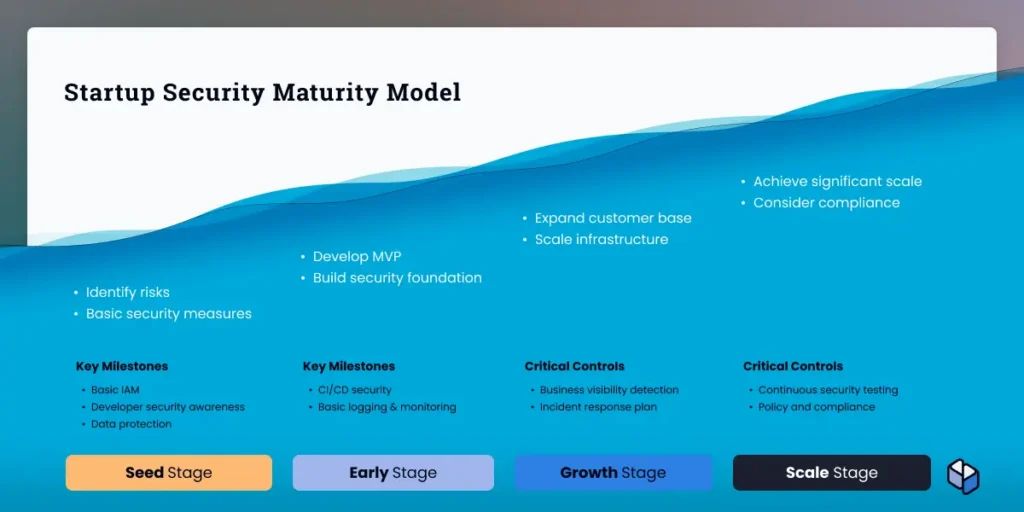
Security maturity moves in bursts. Inflection points hit where everything breaks without preparation. The model below maps security needs to headcount, revenue stage, and moments when delaying controls becomes existential.
Sola’s analysis of prompts from over 2,000 security practitioners in 2025 confirms this pattern: among startups and small businesses (up to 100 employees), cloud and infrastructure security is the primary focus. Mid-market organizations (100–1,000 employees) shift attention to application security and vulnerability management. Larger organizations (1,000+ employees) prioritize identity and access governance. Matching your security program to where risk becomes most acute at each growth stage keeps you focused on what matters now, not what you’ll need in two years.
Survival mode (0–10 employees, pre-seed to seed)
Security lives in access controls and baseline hygiene. Password manager, MFA on every account, and full-disk encryption cover basics. One person owns security at 10–15% of their role. When the answer is “nobody,” ownership gaps compound fast, and incidents take longer to contain.
Foundation building (10–50 employees, Series A)
This stage requires formalizing ad hoc practices. Write security policies. Implement basic logging and monitoring. Start quarterly access reviews. Document your incident response plan, even if it’s two pages.
Appoint a security owner at 25% of someone’s time. Tools stay lean: centralized logging, vulnerability scanning in CI/CD, and vendor risk assessment templates. Compliance conversations begin here, driven by sales.
The 50-employee inflection point
Security at 50 employees looks nothing like security at 25. Enterprise deals gate on SOC 2, customer security questionnaires multiply, and informal processes break. If enterprise deals are already in your pipeline, plan SOC 2 kickoff early at this stage. Waiting until buyers ask for the report means you’re already months behind.
Compliance becomes imperative here. Underinvesting at this stage usually shows up as stalled deals and last-minute scrambles when a buyer’s procurement team sends over a security questionnaire.
Scaling security (50–200 employees, Series B)
At this stage, compliance frameworks like SOC 2 Type 2 often come into play, typically driven by customer requirements, data sensitivity, or procurement processes. You need continuous monitoring, automated evidence collection, and someone owning compliance full-time. A GRC (Governance, Risk, and Compliance) platform like Vanta, Drata, or Secureframe or a dedicated hire. Vendor risk management formalizes.
Security becomes cross-functional, not just an engineering problem. Budget security tooling at 3–5% of ARR.
Organizational security (200+ employees, Series C and beyond
Build your first security team. In most cases, your first hire is a hands-on generalist rather than a security executive, though customer pressure or board expectations can shift that timeline. The Building Your First Security Team section below covers the full progression.
Each stage builds on the last. Skipping ahead means circling back under pressure when audit findings or customer requirements force remediation.
Foundation security: the non-negotiables every startup must get right
Foundation security means covering five areas where a single gap can take down your startup. Everything else gets added incrementally as revenue and headcount grow. These aren’t aspirational best practices, but controls to prevent failures when operating with constrained resources and zero margin for error.
The framework: identity and access management, data protection, incident response, cloud and SaaS security, and supply chain risk. Miss one, and you’ve left an obvious entry point. Cover all five at minimum viable level, and you’ve addressed the attack surface mattering most for companies under 200 people.
Real-world data backs up that focus. Sola’s 2025 analysis of prompts from over 2,000 security practitioners found that four domains account for 67% of all security questions: application security (25.8%), cloud and infrastructure security, security operations, and identity and access management. The areas where teams actually spend their time map closely to the foundation security framework above.
Going beyond them pulls focus from shipping. Skipping any leaves gaps appearing in security questionnaires, SOC 2 audits, and actual incidents ending with breach notification costs, customer churn, and reputational damage taking years to rebuild.
Identity and access management on a shoestring
Microsoft has reported that more than 99.9% of the compromised accounts it tracks don’t use MFA, which is why enforcing MFA is still one of the highest-ROI controls you can deploy.
Start with a password manager. 1Password, Bitwarden, or Dashlane cost roughly $8 per user monthly and eliminate password reuse. Enforce MFA on every account: email, code repositories, cloud consoles, SaaS admin panels, and anything touching customer data. Use hardware security keys for highly privileged accounts if budget allows, or authenticator apps as minimum acceptable standard.
Role-based access and least privilege come next. When someone joins, they get exactly what their role requires. Nothing more. When they leave, revoke all access within one hour.
Offboarding procedures matter more than most founders realize. A former employee with lingering admin access becomes a liability once they’re no longer under your employment agreement.
Quarterly access reviews catch drift. Every 90 days, each system owner confirms who has access and why. Remove accounts no longer needing it. A 30-minute quarterly call prevents access sprawl turning into audit findings or attack vectors.
Data protection that doesn’t break your product velocity
Encryption at rest and in transit is non-negotiable. If your database isn’t encrypted, enable it today. If your application doesn’t enforce HTTPS everywhere, fix it this week. These baseline controls take hours to implement and prevent entire breach categories.
Simple data classification for startups works with four tiers: public, internal, confidential, and restricted. Public data goes on your website. Internal data stays inside but isn’t catastrophic if leaked. Confidential data includes customer information, contracts, and financial records. Losing it damages trust and triggers notification requirements. Restricted data covers credentials, encryption keys, and anything regulated under GDPR, HIPAA, or PCI-DSS.
Privacy controls follow geography and industry. GDPR can apply if you process personal data of individuals in the EU/EEA – whether you’re serving customers there, offering goods or services, or monitoring behavior. HIPAA applies touching protected health information. PCI-DSS applies processing credit cards. Don’t build unnecessary privacy controls, but understand trigger points so you’re not retrofitting compliance under customer deadlines.
Integrate security scanning into CI/CD. GitHub Advanced Security, Snyk, or Semgrep catch vulnerabilities before shipping. Make security easy for developers. Automated scanning in pull requests beats manual code review because it scales with your team and catches issues at creation, not three months later during pentests.
Incident response for teams of one (or two)
A minimum viable incident response plan fits on two pages. Cover detection, initial response, investigation, containment, recovery, and post-mortem. When an incident hits, you need a decision tree, not a 40-page document nobody’s read.
The six-step process
- Detection: How do you know something’s wrong? Automated alerts from logging, customer reports, or anomalous behavior flagged by monitoring tools trigger response.
- Initial response: Who do you call first? Designate a primary responder and two backups. Include contact info for legal counsel, your cloud provider’s support team, and key customers needing immediate notification.
- Investigation: What happened and what’s exposed? Preserve logs, identify the attack vector, and determine scope of data access or system compromise.
- Containment: Stop the bleeding. Isolate affected systems, revoke compromised credentials, and block malicious IP addresses.
- Recovery: Restore normal operations. Rebuild from clean backups, verify system integrity, and confirm threat elimination before bringing systems back online.
- Post-mortem: What do we fix so this doesn’t happen again? Document timeline, root cause, and specific remediations with owners and deadlines.
Communication plan templates
Pre-write your internal notification (team Slack message), customer-facing disclosure (email template with blanks for incident-specific details), and legal/regulatory notification (adapted by jurisdiction). The middle of an incident isn’t the time to draft communications from scratch.
Hour-by-hour breakdown for the first 24–48 hours
Hour 0–2: Confirm incident and activate response team. Hour 2–6: Investigate scope and contain threat. Hour 6–12: Notify stakeholders and begin recovery. Hour 12–24: Restore services and validate fixes. Hour 24–48: Conduct initial post-mortem and document lessons learned.
Timelines compress under pressure. Having structure prevents skipping critical steps.
Cloud and SaaS security essentials
Publicly exposed cloud storage remains one of the most common and damaging cloud misconfigurations, risking data exposure and attacks. The Capital One breach exposed more than 100 million records after an attacker exploited a misconfigured web application firewall in Capital One’s AWS environment.
Common cloud misconfigurations hit the same patterns: exposed S3 buckets, over-permissioned IAM roles, public databases, unencrypted data stores. CSPM (Cloud Security Posture Management) tools like Wiz, Orca Security, or open-source alternatives continuously scan for these issues. Start with native tools (AWS Security Hub, Google Cloud Security Command Center, Azure Security Center) before buying third-party platforms.
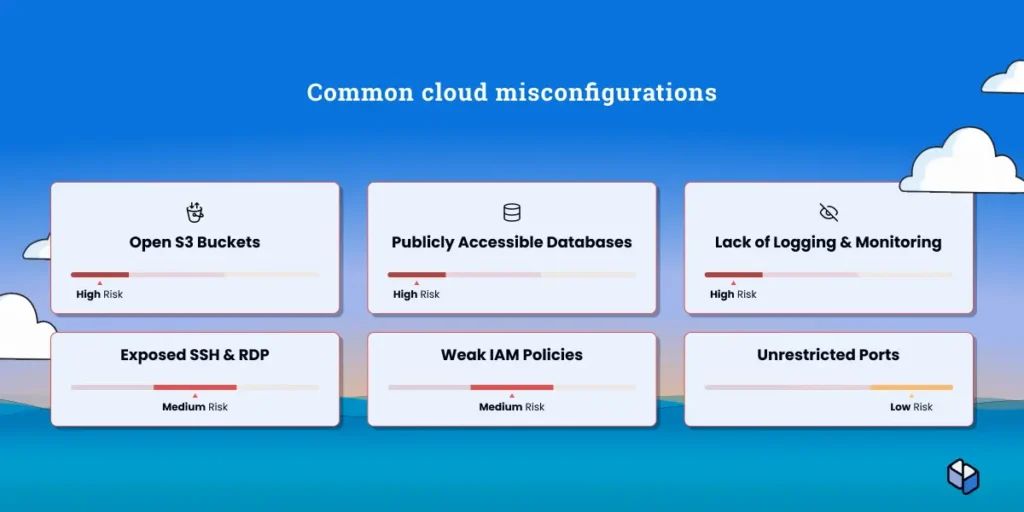
Data exposure is the dominant cloud security concern in practice. According to Sola’s 2025 cybersecurity AI report, 18.0% of all cloud-related security prompts from practitioners focused on data exposure, with “publicly accessible” as a recurring phrase. Cloud providers (AWS, Azure, GCP) appeared directly in 8.9% of all prompts across the dataset, reflecting how central cloud misconfigurations are to the security concerns of lean teams.
SaaS sprawl becomes unmanageable fast. The average company uses 100+ SaaS tools, each representing an access point, potential misconfiguration, and vendor risk to assess. Maintain an inventory, enforce SSO where possible, and review admin access quarterly.
Undocumented SaaS tools, applications employees adopt without IT approval, create blind spots. Tools like Nudge Security or Productiv help discover these applications. Focus on visibility first: you can’t secure what you don’t know exists.
Infrastructure-as-code security scanning catches misconfigurations before deployment. Checkov or Terrascan scan Terraform, CloudFormation, and Kubernetes configs for security issues. Integrate them into CI/CD so bad configs never reach production.
Supply chain and third-party vendor risk
SecurityScorecard reported that 35.5% of the breaches it analyzed in 2024 involved third-party compromises, up 6.5% from the prior year. Your vendors’ security becomes your security, and a breach at a third-party processor can expose your data as effectively as a direct attack.
Lightweight vendor assessment framework
Create three vendor tiers based on data access and sensitivity. Critical vendors handle customer data or provide core infrastructure: cloud hosting, payment processors, CRM. These get full security assessments. Important vendors are business-critical but have limited data access: email marketing, analytics. These get questionnaires. Standard vendors have minimal risk exposure: company swag, event management. These get basic verification.
The four-question vendor assessment
- Do they have SOC 2 or ISO 27001? These certifications prove third-party validation of security controls.
- How do they handle your data? Where is data stored geographically? Is it encrypted? Who has access? What’s the retention policy?
- What’s their incident response process? How quickly will they notify you of a breach? What support during incidents?
- When was their last security audit? Recent audits (within 12 months) indicate active security programs. Stale audits suggest neglect.
For many lower-risk vendors, a short documentation review may be enough. Critical vendors usually need a deeper assessment, especially around data handling, breach notification, access controls, and audit coverage. Tools like Whistic, OneTrust Vendorpedia, or SecurityScorecard centralize vendor risk management, but a spreadsheet works until 50+ vendors.
The startup security stack: tools that actually fit your budget
Security tooling follows headcount and complexity, not aspirational enterprise architecture. The right stack delivers coverage without unsupportable operational overhead. The progression moves from essential free and low-cost tools at early stages to strategic investments as compliance requirements emerge to enterprise-grade platforms once security becomes a dedicated function. The numbers below are rough planning ranges, not universal benchmarks. Actual spend depends heavily on customer requirements, data sensitivity, cloud footprint, and how much you outsource.
Essential tier: free and nearly-free security tools
At 0–25 employees, security spending stays minimal while covering highest-risk gaps. Password managers like 1Password or Bitwarden run $8 per user monthly. MFA enforcement builds into Google Workspace, Microsoft 365, Okta at roughly $3 per user monthly. Vulnerability scanning uses GitHub Dependabot (free), Snyk (free tier), or OWASP Dependency-Check (open source). Endpoint protection starts with Microsoft Defender (included with M365) at $8–15 per endpoint monthly. Logging relies on cloud-native options like AWS CloudTrail, GCP Cloud Logging, or Azure Monitor.
Total monthly cost for 20 a 25‑person team can cover essential security controls for roughly 500–600 USD per month (≈20–25 USD per user). Exact costs vary by vendor and existing SaaS licenses.
Growth tier: strategic security investments
At 25–100 employees, compliance conversations begin and security moves from hygiene to formalization. SIEM-lite or centralized logging through Datadog Security Monitoring, Elastic Security, or Sumo Logic runs $500–2,000 monthly. GRC platforms like Vanta, Drata, or Secureframe cost $12,000–30,000 annually and automate SOC 2 evidence collection, cutting compliance prep time by 60–80%. CSPM tools like Wiz or Orca Security at $10,000–40,000 annually catch cloud misconfigurations before breaches. EDR (Endpoint Detection and Response) upgrades to CrowdStrike or SentinelOne at $30–50 per endpoint monthly.
Total annual cost for 50 people reaches $60,000–100,000, timed to coincide with Series A funding and early enterprise customer acquisition.
Scale tier: enterprise-grade security on a startup timeline
At 100–200+ employees, security becomes dedicated with specialized tooling. Full SIEM deployments through Splunk, Sumo Logic, or Chronicle Security run $50,000–200,000 annually. Penetration testing becomes annual or biannual at $15,000–40,000 per engagement. Security orchestration via Tines or Torq costs $20,000–60,000 annually and automates repetitive security workflows. Advanced threat detection adds specialized tooling based on your specific threat model.
Total annual cost for 150 people sits at $200,000–400,000, scaling with enterprise customer growth.
Build incrementally based on audit findings and customer requirements rather than implementing everything simultaneously.
Compliance without the compliance team: SOC 2, ISO 27001, and beyond
SOC 2 tends to become urgent when you start selling into larger customers, handling more sensitive data, or facing repeated security reviews in procurement. For many startups and SMBs, that happens somewhere between early growth and mid-market expansion, but the trigger is buyer pressure, not a magic employee count.
The DIY SOC 2 playbook
Month 1 focuses on scoping and readiness. Pick your trust service criteria. Security is mandatory, the other four are optional based on customer requirements. Document current controls, mapping existing practices to SOC 2 requirements. Identify gaps, prioritizing by implementation difficulty and audit impact. Select your auditor and budget $10,000–25,000 for Type 1.
Months 2–3 shift to control implementation. Close gaps identified during scoping. Common missing controls include formal quarterly access reviews, documented vendor risk assessments, tested incident response procedures, security awareness training, and change management documentation. GRC platforms like Vanta or Drata automate evidence collection and shrink implementation timelines by 4–6 weeks.
Month 4 covers audit and reporting. The auditor tests controls, reviews evidence, and issues your report. Remediate findings quickly. Open findings delay report issuance and damage customer confidence. SOC 2 Type 2 follows 6–12 months later. Plan $15,000–35,000 for Type 2 audits.
ISO 27001, HIPAA, and PCI-DSS
ISO 27001 provides international credibility but requires heavier documentation than SOC 2. Pursue ISO 27001 when expanding globally or when EU customers specifically request it, typically at Series B or later. Certification costs $20,000–50,000 including consulting and audit fees.
HIPAA applies only if you handle protected health information (PHI). Don’t assume HIPAA compliance is required unless you’ve confirmed PHI handling with legal counsel.
PCI-DSS applies if you process, store, or transmit credit card data directly. Most startups avoid this entirely by using Stripe, Square, or other payment processors that assume compliance burden. The cost and complexity of PCI-DSS compliance rarely justifies direct card processing for companies under 200 employees.
When to outsource vs. build in-house
Outsource when you lack expertise, need coverage immediately, or face compliance deadlines that can’t slip. Build in-house when security becomes a competitive differentiator, you’ve hired security talent, or outsourcing costs exceed internal hire costs.
Outsource these first: SOC 2 audit preparation through specialized consultants reduces timeline by 30–50%. Penetration testing requires specialized offensive security skills that rarely justify full-time headcount at most startups. The threshold depends on your attack surface, customer requirements, and how frequently you need testing. Security awareness training programs run more effectively through vendors like KnowBe4 who maintain current content. 24/7 monitoring via an MSSP (Managed Security Service Provider) provides overnight and weekend coverage without hiring security operations staff across multiple time zones. Specialized assessments like threat modeling, architecture reviews, or compliance gap analyses benefit from external perspective.
Build these in-house: Access management decisions require deep understanding of your organization, role structures, and data flows that external providers can’t match. Incident response coordination needs someone who knows your systems and has authority to pull in engineering resources during active incidents. Security roadmap development requires balancing business priorities, technical constraints, and risk tolerance in ways demanding internal context.
The security owner should be internal even if execution is outsourced. At 40 employees, this might be your VP of Engineering at 15% capacity. At 100 employees, it becomes a full-time security engineer role.
The hybrid approach blends internal ownership with external execution. Platforms like Sola let you ask security questions in plain language across your entire stack (cloud, SaaS, identity, endpoints and more) and build custom security solutions in minutes, without hiring a full team. Then bring specialized expertise in-house as headcount and budget allow, typically starting with hands-on security engineers around 75–100 employees.
Building security culture when everyone wears multiple hats
Security culture starts with leadership treating security as a business enabler. When founders visibly prioritize security (budgeting for tools, making time for training, celebrating secure practices), teams follow. Budget signals priority more clearly than any policy document.
Security-aware engineering starts with secure defaults in your development environment. Require MFA for code repositories. Encrypt laptops through device management. Enforce code review for all production changes. Run automated security scans in CI/CD pipelines. Make the secure path the easy path. Security requiring extra steps gets skipped under deadline pressure.
Monthly 15-minute security check-ins keep security visible without overhead. Rotate topics: phishing awareness, password hygiene, incident response roles, new tool rollouts, or recent security news relevant to your industry. Keep it conversational. Share real examples from your industry instead of generic threats.
Getting buy-in from founders and leadership
Translate security into business outcomes. Don’t lead with “We need SOC 2 for compliance.” Lead with “Three enterprise deals worth $400K ARR are blocked until we complete SOC 2, and we can close them within 60 days of receiving our report.”
Frame every security investment in revenue impact, deal velocity, or risk reduction with dollar figures attached. A $30,000 SOC 2 investment that unblocks $400,000 in ARR generates 13x return in the first year.
When requesting a security budget, present three options: minimum (covers foundation security and immediate compliance needs), recommended (adds monitoring and proactive controls), and comprehensive (approaches enterprise-grade coverage). Founders appreciate choice and context over binary approve/reject decisions.
Scaling your security program: from 10 to 100 to 1000 employees
Security scales in stages, not continuously. The 10-person program focuses on hygiene and access controls. The 50-person program adds compliance and monitoring. The 200-person program requires dedicated security headcount and specialized tooling.
Anticipate inflection points 6 months before you hit them. Starting SOC 2 before buyer pressure hits means you’ll have the report ready when deals need it. Waiting until procurement teams ask means delivering reports months after you’ve already lost deals to compliance delays.
Resource allocation follows a rough formula: 0–50 employees need 10–25% of one person’s time plus $5,000–15,000 in annual tooling. 50–150 employees need one full-time security owner plus $60,000–100,000 in tooling and services. 150–500 employees need 2–3 security staff plus $200,000–400,000 in comprehensive tooling.
Building your first security team
In most cases, your first security hire is a hands-on generalist who can configure tools, respond to incidents, run SOC 2, and answer security questionnaires. Add GRC, cloud security, or AppSec specialists depending on your gaps. But if security is already a board-level issue, or enterprise buyers need a named security owner, leadership may need to come earlier.
They’ll spend 60% of their time on compliance and customer questionnaires, 25% on tooling and architecture, and 15% on incidents and escalations.
CISO-level hires typically make sense once you have a small security team to lead and enough organizational complexity to warrant dedicated strategy. For some companies that’s around 150 employees, for others it’s closer to 300+. The deciding factors are customer pressure, regulatory exposure, and whether security decisions need board-level representation.
Typical first hires follow this progression: security engineer at 50–100 employees who owns implementation and technical controls, GRC specialist at 100–200 employees who owns compliance programs and customer assurance, and security leadership (CISO or VP Security) once organizational complexity, customer requirements, or board expectations demand dedicated strategy, often between 150–500 employees depending on industry and deal profile.
Your 90-day security quick start plan
This plan covers foundation security fast enough to matter. Each 30-day block builds on the previous, with specific deliverables reducing risk immediately.
Days 1–30: Immediate risk reduction
- Enforce MFA everywhere. Start with email, then add code repositories, cloud consoles, and SaaS admin panels.
- Deploy password manager. Choose 1Password, Bitwarden, or Dashlane. Require use for all work accounts within two weeks.
- Enable full-disk encryption. macOS FileVault, Windows BitLocker, or Linux LUKS encrypt devices in under 30 minutes per machine.
- Conduct access audit and remove stale accounts. Review every system where you have 5+ user accounts. Remove anyone who left or changed roles.
- Document incident response contacts. Create a one-page document with primary security contact, backup contacts, legal counsel, cloud provider support, and key customer contacts needing immediate notification during incidents.
Days 31–60: Foundational controls
- Implement centralized logging. Enable CloudTrail (AWS), Cloud Logging (GCP), or Azure Monitor. Export logs to central store with 90-day retention minimum.
- Start vulnerability scanning in CI/CD. Add Dependabot, Snyk, or Semgrep to your code repositories. Fix critical and high-severity findings.
- Create vendor inventory and risk tiers. List all vendors with access to your data or systems. Categorize as critical, important, or standard.
- Write a two-page incident response plan. Cover the six-step process: detection, initial response, investigation, containment, recovery, post-mortem.
- Schedule quarterly access review cadence. Calendar 30-minute reviews for 90 days out. Assign system owners.
Days 61–90: Compliance readiness
- Assess SOC 2 requirements and timeline. If enterprise deals are coming, start scoping SOC 2. Request current SOC 2 reports from critical vendors.
- Implement basic security awareness training. Run phishing simulation and 30-minute security training for all employees.
- Document your security policies. Write acceptable use policy, incident response policy, and data handling policy. Two pages each.
- Set up automated security monitoring. Configure alerts for critical events: new user creation, permission changes, failed login attempts, unusual data access.
- Review and update access controls. Ensure least privilege is enforced. Remove unnecessary permissions discovered during initial audit.
Key takeaways
- Match your security program to your headcount stage. A 15-person startup optimizes for survival and velocity. Enterprise playbooks assume resources and headcount you don’t have yet.
- Assign a security owner early, even at 25% of someone’s existing role. Ownership gaps compound fast and make incidents harder to contain.
- The 90-day quick-start plan prioritizes the highest-risk gaps: MFA and password management in days 1-30, centralized logging and a two-page incident response plan in days 31-60, SOC 2 scoping and security training in days 61-90.
- 35.5% of 2024 data breaches originated from third-party compromises. Tier vendors by data access and run a four-question assessment for critical vendors; the whole review takes about 15 minutes.
- Outsource SOC 2 audit prep, penetration testing, and security awareness training. Keep access management decisions, incident response coordination, and security roadmap ownership internal.
Kickstart your startup’s security program with Sola.

COO & Co-Founder, Sola Security
With two decades of cybersecurity battles as Global CISO at LivePerson and working closely with hyper-growth tech companies and startups as CEO of ProtectOps, Ron oversees Sola’s operations and security innovation. Enjoys urban landscape photography in his spare time.