TL;DR
Audit roles, spot escalations, protect service accounts
Detecting broad GCP permissions means identifying overprivileged roles, risky combinations that enable privilege escalation, and service account vulnerabilities. Sola can help you map these issues, but here’s what’s legit according to GCP.
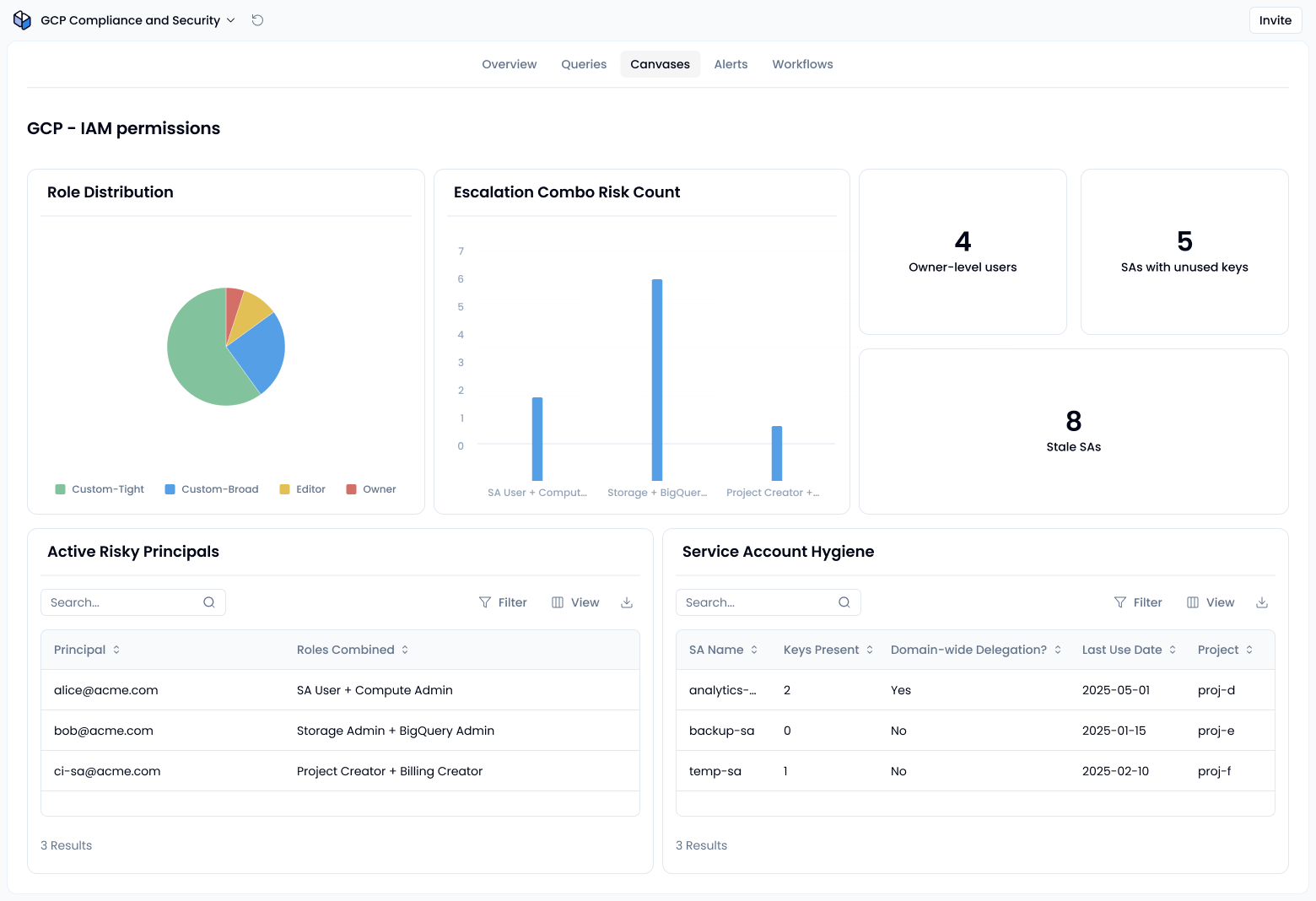
With Sola, you can use our AI assistant to instantly surface users and service accounts with overly broad permissions, grouped by role type, access patterns, and escalation risk.
With Sola, you can use our AI assistant to instantly surface users and service accounts with overly broad permissions, grouped by role type, access patterns, and escalation risk.
Sola apps that could help you
Visit the Templates GalleryHow to spot broad permissions in Google Cloud Platform
1. Wildcards aren’t a thing, but privilege breadth still is
GCP IAM doesn’t allow wildcard permissions like compute.*.list; you must explicitly list out each permission in custom roles. So, your focus should be on detecting roles with broad, overly permissive authorities, like Owner or Editor, or custom roles that grant sweeping access.
Action: List users and service accounts with built‑in roles like Owner, Editor, or broad custom roles. Highlight roles that span multiple unrelated services.
2. Watch for privilege escalation combos
Certain role combinations are classic escalation paths. For example:
- Service Account User + Compute Admin enables escalation by attaching privileged service accounts to instances.
- High-privilege roles across data domains (like Storage Admin and BigQuery Admin) increase lateral movement risk, even if not a direct escalation path.
- Billing Admin + Project Creator can be abused to spin up projects and link billing accounts
You can simplify detection by using AI to highlight dangerous permission combos and role overlaps. Platforms like Sola already support this type of analysis through multi-platform access auditing and permissions inheritance reviews.
For long-term control, also review your organization’s role sprawl using this RBAC sprawl guide, especially when access is granted across cloud and SaaS platforms.
3. Secure service accounts and detect external access
According to GCP best practices, service accounts pose a major risk when improperly managed. Avoid default service accounts, disable unused ones, and don’t allow broad impersonation unless strictly required.
Action: Audit external accounts (e.g., Gmail addresses, third-party collaborators) with wide access, and flag stale or overly privileged service accounts—especially those with unused keys or domain-wide delegation.
Visibility into account activity can be improved by enabling GCP audit log monitoring and analyzing key abuse patterns.
Why it matters
Overarching permissions and overlooked combos are easy to miss in busy environments. Without a clear view, attackers exploit these gaps for privilege escalation or lateral movement. GCP’s inheritance model only deepens the risk.
Use AI to simplify reviews
Sola helps you create your own GCP access audit app to monitor, flag, and visualize permission inheritance issues across your cloud environment.
- Scan for users/service accounts with high-level permissions
- Identify risky role pairings
- Visualize inherited access paths and external collaborators
- Highlight service account abuse zones (e.g., unused accounts, domain‑wide delegation)
Instead of hand‑cranking IAM policy analysis, use AI to surface insights fast. Ask: “Show users with Owner-level access,” or “Which service accounts can impersonate others across projects?”. You can also layer this insight into your broader cloud monitoring workflows or pair with startup-specific security essentials if you’re working in a high-growth environment.