Shadow AI exposure: What one OAuth approval triggered

TL;DR
- An employee at Sola approved a standard ChatGPT-to-Google Drive integration, and 21 days later a single prompt quietly triggered the retrieval of more than 400 internal documents to third-party service.
- The files spanned nearly every business function, and they left the organization’s control boundary regardless of whether the AI provider retains them.
- Most monitoring layers in a typical security stack (EDR, CASB, DLP) are designed around user and device activities. A backend AI process operating through API tokens can bypass much of that visibility.
- Sola’s security innovation team discovered this while improving Google Workspace capabilities.
- Security teams can get ahead of this by auditing AI OAuth tokens, segmenting sensitive data away from AI-connected apps, and building monitoring around OAuth-level activity.
We use Sola Security to protect our own stack, and it recently enabled us to detect an unintentional data retrieval spike between ChatGPT and Google Drive. OpenAI is an authorized service provider for Sola, so no breach occurred and no unauthorized parties accessed the data, but it highlights ‘Shadow AI’ as a risk if not monitored correctly. In this post, we’re sharing the new capabilities and controls we’ve implemented to help you manage these emerging threats using Sola Security.
We approved a ChatGPT-to-Google Drive integration for an employee at Sola. Standard OAuth flow, standard consent screen, standard “read-only” scope. The kind of thing security teams sign off on every week.
Twenty-one days later, that employee asked ChatGPT a simple question about enabling SSO. In the 42 milliseconds that followed, the application’s backend silently retrieved more than 400 internal documents from Google Drive. Product roadmaps, go-to-market plays, security procedures, and more. No customer or personal data, but internal documents nonetheless. No alert fired on traditional security tools and the employee had no idea of the scope of data involved.
Our security innovation team found this while improving Sola’s own Google Workspace monitoring integration. What follows is the full story: how one prompt triggered a mass file retrieval, why none of the traditional monitoring controls caught it, and what your team can do to get ahead of the same blind spot.
Shadow AI goes deeper than unauthorized tools
When security leaders hear “Shadow AI,” most picture an employee sneaking an unauthorized chatbot onto a corporate laptop. A rogue browser extension. Maybe an intern pasting source code into a free large language model (LLM).
But that framing misses the bigger exposure.
Shadow AI covers any AI behavior in your organization that you can’t see or control. And risk can also live inside integrations your team already reviewed and approved: the OAuth connection your CISO greenlit, the Google Drive plugin that went through IT’s standard vetting, the AI coding assistant your engineering team adopted with full procurement sign-off, and the Slack bot that indexes conversations to feed an LLM summary feature.
AI now touches nearly every layer of a modern organization. Your developers use AI coding assistants (GitHub Copilot, Cursor, Claude Code) that interact with proprietary repositories. AI desktop applications sit on corporate endpoints with access to local files and system data. In some environments, teams integrate LLMs into production pipelines and continuous integration/continuous deployment (CI/CD) workflows where the downstream data flows are harder to track. And across your SaaS stack, AI tools connect through OAuth tokens tied to corporate email accounts, gaining read access to collaboration platforms, cloud storage, and internal documents.
Each of those layers carries its own risk profile. But for this article, we’re going to zoom in on the one that affects virtually every organization: the native SaaS-to-AI integration. It requires no technical skill to set up, follows a standard OAuth flow that feels routine, and as we discovered firsthand, it can create data exposure that’s invisible to traditional monitoring.
The access starts with a simple OAuth consent screen, and what happens next is worth understanding step by step.
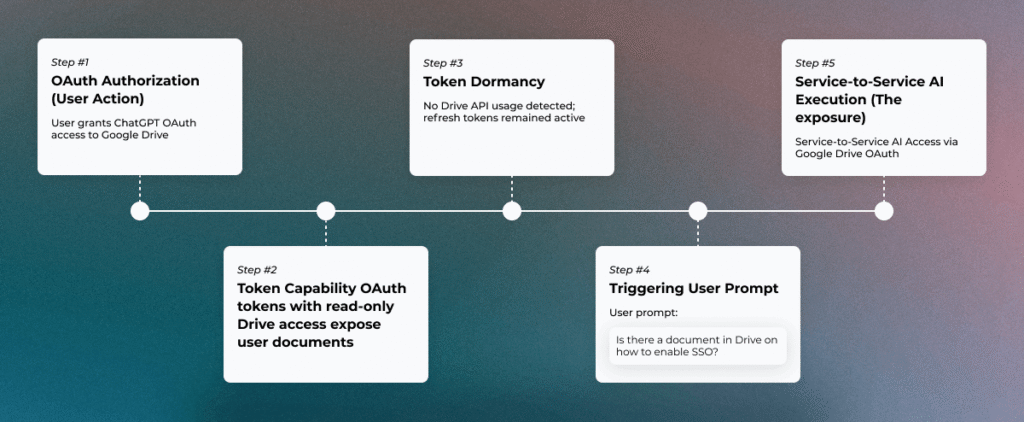
What happens after the OAuth consent screen
An employee wants to use an AI copilot with their Google Drive. They click “Connect,” a standard Google consent screen appears, they review the permissions, and they approve. The whole process takes about ten seconds.
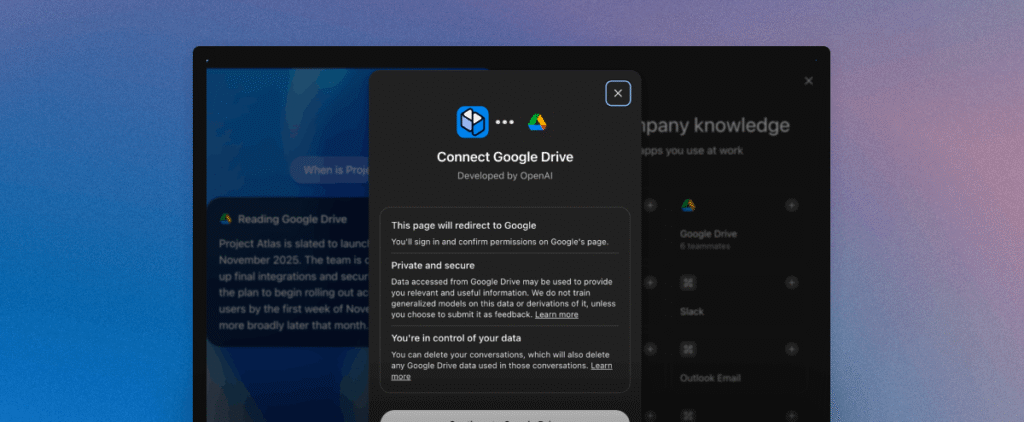
But the scope granted in those ten seconds is worth examining closely. In our case, the consent included drive.readonly (read access to every file the user can reach), directory.readonly (organizational directory information), contacts.readonly, and several identity-related scopes. A single approval gave the application access to read the full contents of any document, spreadsheet, presentation, or PDF the employee could open, plus visibility into the company’s directory structure.
And the access doesn’t expire when the employee closes their browser tab. OAuth refresh tokens allow the application to call Google’s APIs without re-authentication for extended periods without additional user interaction. The employee approved access on a Tuesday morning, and weeks later those tokens were still active, still capable of reading every shared document in the employee’s Drive.
Security teams evaluate these integrations, and read-only permissions are a sound practice. The permission model itself isn’t the concern. What the OAuth consent screen doesn’t surface is when, how often, or at what volume the application will use that access behind the scenes. The scope of access and the ongoing behavior of the application are two separate questions, and the consent screen only answers the first one. Long-lived tokens with no built-in expiration mean the application can retrieve files days or weeks later, through a backend process the user never sees.
For 21 days after our employee clicked “approve,” those tokens sat completely idle. Then came a single prompt, and the backend woke up.
One prompt, 400+ files, zero alerts on traditional tools
Some 3 weeks later, the employee typed a straightforward question into ChatGPT: “Is there a document in Drive on how to enable SSO?”
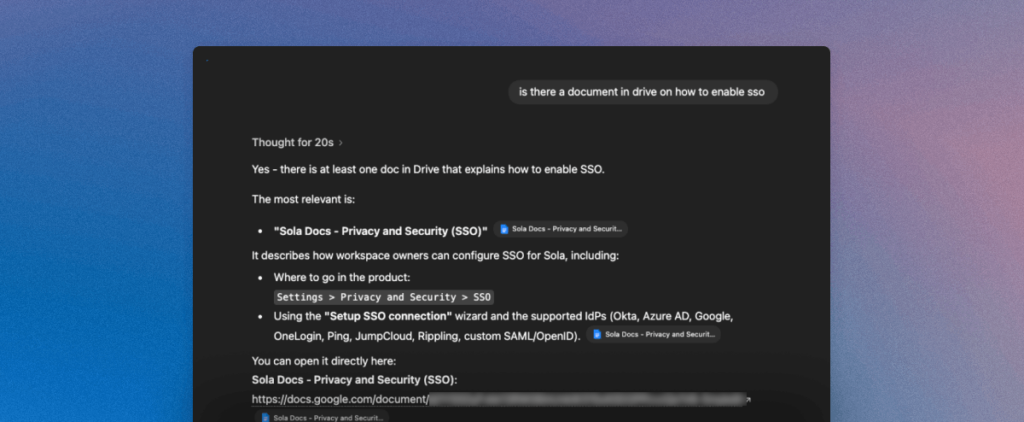
Within milliseconds, ChatGPT’s backend infrastructure executed a full Drive enumeration. Our logs show the burst clustered between 10:43:29.236 and 10:43:29.278, a window of roughly 42 milliseconds. In that window, the application called drive.files.list to inventory the user’s accessible files, then executed drive.files.get to download 404 of them in parallel. The requests came from four cloud-based IP addresses, confirming server-to-server execution with no device or browser involved.
The retrieved files, a mix of Google Docs, Sheets, Slides, and PDFs: product roadmaps, marketing plans, customer-facing documentation, security procedures, internal strategy notes, and more.
So why did a question about SSO trigger a download of hundreds of unrelated files?
The likely mechanism is some form of retrieval-augmented generation (RAG) pipeline. When the user asks a question, the AI backend doesn’t search Drive the way a human would (opening one file at a time). Instead, it enumerates available documents, ingests their content into a vector store for semantic matching, and then retrieves the passages most relevant to the prompt. The ingestion step is broad by design, because the model needs a corpus to search against.
But notice what didn’t happen during any of this: no user clicked or opened files, no one downloaded anything through a browser, no endpoint played any role, the application never requested additional permissions, and no alert fired anywhere in our traditional security stack.
The entire event looked like nothing, which is exactly why traditional monitoring never flagged it.
Why traditional monitoring didn’t catch It
The reason is straightforward: the tools in most security stacks were built to watch humans, not backend AI processes.
Endpoint detection and response (EDR) monitors device-level activity, but no endpoint was involved here. The data moved directly from Google’s APIs to cloud-hosted infrastructure through server-to-server calls. Cloud access security brokers (CASBs) track user sessions with cloud applications, but the ChatGPT backend doesn’t authenticate through a browser. It uses OAuth tokens to call APIs directly, bypassing session-based monitoring entirely. Data loss prevention (DLP) watches for sensitive content leaving through known channels like email, file uploads, and browser downloads, and a backend API call doesn’t cross any of them.
The shared assumption across all of these layers: a human actor drives the data movement. When an AI application operates autonomously through API tokens, that assumption breaks down. The activity happens server-to-server, with no user session, no device footprint, no browser trail, and no download event in any log your SOC typically watches.
So what should security teams look for? The signals exist in Google Workspace admin logs, and we’ll cover specific detection patterns in the remediation section below.
Knowing what to detect is one thing. Understanding how the problem surfaced in the first place adds another dimension to the story.
How we found It in our own environment
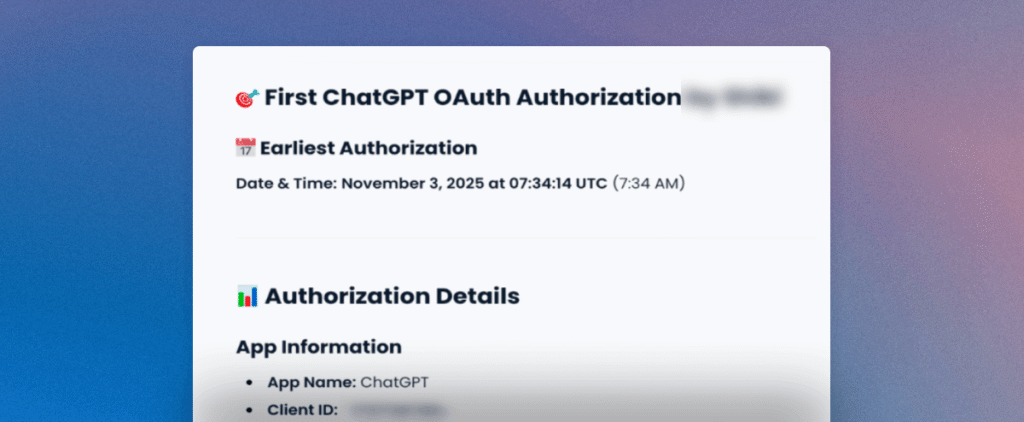
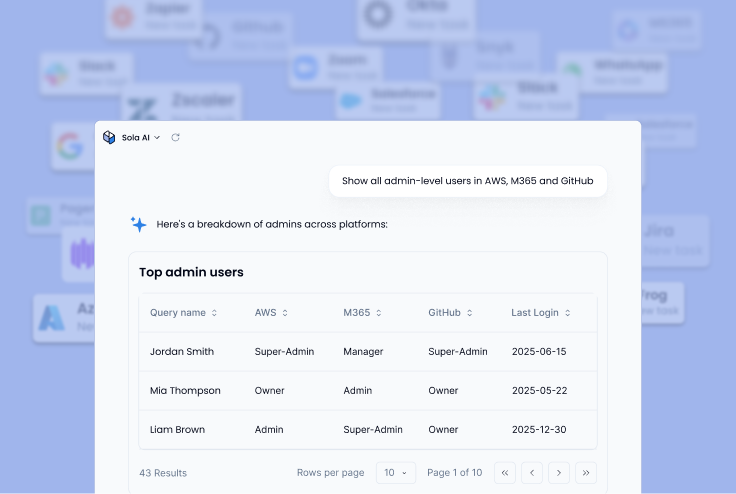
Our security innovation team was working on improving Sola’s Google Workspace integration, building out richer capabilities for monitoring and analyzing OAuth activity to help surfacing security-relevant patterns. Once the new data pipelines were in place, we started testing with queries against our own environment with questions that any security practitioner would be interested in, for example: Look through all my OAuth logs in the past 7 days and show me anomalies.”
Sola surfaced multiple findings. Most were benign or expected. But one result stood out immediately: a massive spike in Drive API activity that dwarfed every other pattern in the data.
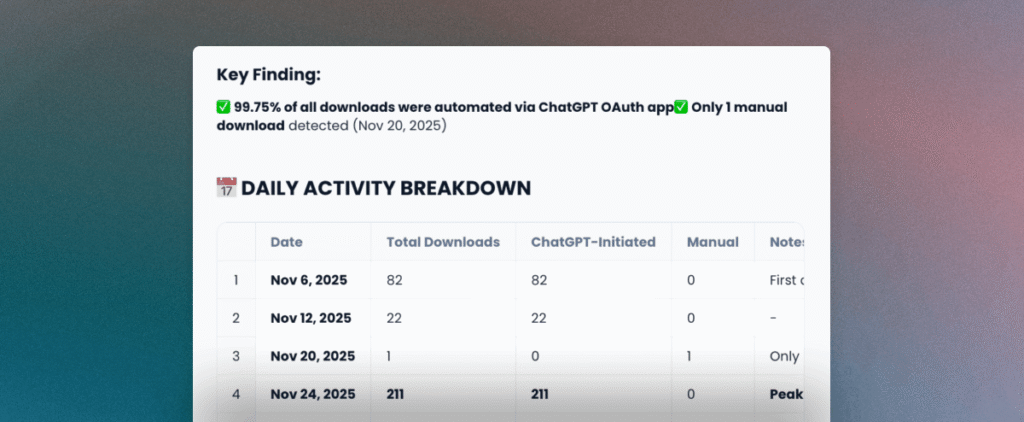
We pulled the raw Google Workspace admin logs to cross-reference. The numbers matched. The spike corresponded exactly, and tied to a single OAuth client ID belonging to ChatGPT, all originating from Azure infrastructure IPs. The AI’s output was accurate, and the underlying event was real.
While OpenAI is a legit, authorized service provider to Sola, and the Google Drive-to-OpenAI connection was authorized, this anomaly was identified while improving our own product capabilities, and as part of our routine monitoring. Without proper visibility into OAuth-level activity and the ability to ask open-ended questions across that data, we could’ve missed this anomaly. We believe that many organizations that use Google Workspace and OpenAI are not fully aware of the way it works.
The risk that doesn’t need a breach label
When we presented these findings to security professionals, some pushed back. The integration did what its permissions allowed. Nobody exploited a vulnerability, and no attacker was involved. So where’s the problem?
It’s a fair question, and the answer depends on how your organization defines risk.
Internal data was transferred from Google’s infrastructure to third-party servers on Azure without sufficient visibility for the security team. Although the transfer involved an authorized partner under a formal agreement, enhanced oversight is required for such workflows.
And then there’s the proportionality problem. An employee asked a single, narrow question about SSO configuration. The backend responded by retrieving hundreds of unrelated files. For larger organizations where employees have access to broadly shared drives, a single OAuth token could expose thousands of documents through the same mechanism.
None of this requires labeling the event as a “breach” to take it seriously.
From a data governance perspective, internal documentation left the organization’s control boundary without a sufficient visibility.
What security teams should do now
The exposure described above is preventable without large budget requests. The key is treating AI-connected OAuth integrations as a security control that gets the same scrutiny as any other access layer.
Require security review before any SaaS-to-AI OAuth authorization. If an employee can connect an AI tool to corporate data with a single click and no oversight, the organization has no control over what happens next. Build a lightweight approval flow where security reviews the scopes and makes a deliberate decision before tokens get issued.
Audit existing OAuth tokens for AI applications with broad scopes. Your environment likely has active tokens from AI integrations approved months ago. Review what applications hold drive.readonly or equivalent permissions, which users authorized them, and whether those tokens are still needed.
Segment sensitive data away from AI-connected applications. Rather than connecting AI tools to an employee’s full Drive (which may include broadly shared folders across the organization), create separated environments. Connect AI integrations only to sanitized folders that contain non-sensitive, work-in-progress content.
Push AI providers on proportionate retrieval. A single question should not trigger a full Drive enumeration. Security teams and procurement leaders should ask AI vendors whether their integration supports scoped retrieval, whether users can select specific files or folders rather than granting blanket access, and whether the platform notifies users when bulk access occurs.
Build monitoring around OAuth-level activity. Connect your AI integrations to the same visibility layer as the rest of your security stack. Google Workspace admin logs already capture the signals: OAuth grants, API call volumes, application IDs, and originating IP addresses. The gap for most organizations is alerting logic that watches for the patterns described earlier, like high-velocity drive.files.get bursts from cloud infrastructure IPs and third-party OAuth clients accessing volumes that don’t match normal user behavior. Platforms like Sola can help surface these patterns through natural language queries against your Workspace logs, which is how we found this in the first place.
None of these steps require your team to block AI adoption entirely. The goal is informed enablement: letting your organization use AI tools while maintaining visibility and control over what those tools do with corporate data behind the scenes.
Connecting an app is a security decision
The ChatGPT-Drive case we investigated is one example of a much broader pattern. AI tools now operate across source code repositories, corporate endpoints, production pipelines, and OAuth-connected SaaS applications. Most security teams have limited insight into how far that access actually extends.
Every AI integration that touches corporate data deserves the same treatment as any other access grant: scoped, reviewed, monitored, and revocable. The organizations that get ahead of this will be the ones that stopped treating “Connect to Drive” solely as a productivity decision and started treating it as a security one.
Key Takeaways
- OAuth consent screens show scope, not behavior. The scope of access and the ongoing behavior of the application are two separate questions. A “read-only” token can sit idle for weeks and then retrieve hundreds of files in milliseconds, through a process no one in your organization will see unless you’re specifically monitoring for it.
- Your monitoring stack has a blind spot at the API layer. EDR, CASBs, and DLP all assume a human drives data movement. Server-to-server AI activity through OAuth tokens doesn’t cross any of the channels these tools watch. Detection depends on monitoring OAuth-level signals in your Workspace admin logs, not your existing alert pipeline.
- Proportionality is the overlooked risk in AI integrations. A single narrow prompt can trigger retrieval of an entire Drive’s contents. For organizations with broadly shared folders, one employee’s OAuth token can expose documents from every team in the company, regardless of whether that employee ever opened those files.
- Treating OAuth approvals as security decisions, not IT workflows, is the highest-leverage change most teams can make right now. Review scopes before tokens get issued. Segment sensitive data away from AI-connected folders. Audit what’s already been approved. Small, practical steps that close a gap most organizations haven’t examined yet.
Frequently asked questions

Head of Security Innovation, Sola Security
Idan lives where security meets invention, after years shaping cloud and DevSecOps at Fiverr, AppsFlyer, and Verint. As Head of Security Innovation, and a proud Sola power user, he puts AI to work on the noisy bits so humans keep the judgment calls.