Security posture management in 2026: A practical guide to cross-domain coverage

TL;DR
- Security posture management (SPM) catches what drifts between audits: misconfigurations, access gaps, and compliance drift across cloud, identity, and SaaS. It reduces reliance on point-in-time snapshots without replacing the audits themselves.
- Start with CSPM, then layer in identity (ISPM) and SaaS (SSPM) within six months. AI posture management and data/app/Kubernetes domains come later.
- A phased 90-day rollout with clear finding ownership and severity tuning prevents the alert fatigue that stalls most SPM programs before they add value.
- AI-native platforms that correlate findings across domains let small teams prioritize by actual exploitability instead of raw severity scores.
Security posture management sounds clean and strategic in vendor decks. The operational reality is messier: too many tools generating too many alerts, unclear ownership of findings, and 55% of employees are adopting SaaS applications without security’s involvement.
What follows cuts through the noise and gets specific about what SPM means, which domains to prioritize, and how to build a program that actually moves without burning your team down.
What security posture management actually means (beyond the buzzwords)
Security posture management is the ongoing process of identifying, prioritizing, and resolving configuration weaknesses, access gaps, and compliance deviations across your entire environment. The “ongoing” part is doing the heavy lifting in that sentence, because your environment keeps changing between snapshots regardless of how thorough any single assessment was.
Traditional security assessments give you a snapshot: a penetration test result, an annual audit finding, a quarterly vulnerability scan. Between those cycles, someone spins up an S3 bucket with public access. A contractor account stays active six months after the project ends. A new SaaS tool gets connected to your CRM via OAuth with broader permissions than anyone intended. Those gaps compound silently until the next review.
SPM closes that window. Rather than replacing your audits, it fills the space between them, so misconfigurations surface within hours, orphaned accounts flag automatically, and SaaS app permissions get audited on a schedule. SPM findings also feed directly into audit evidence, making your next SOC 2 or ISO cycle less painful and more accurate.
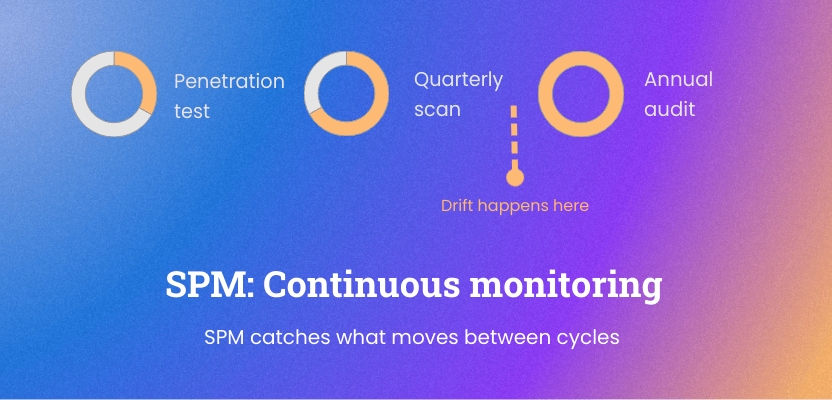
The distinction between posture and compliance is worth making explicit. Compliance measures your controls against a defined standard at a specific point in time. Posture reflects your actual risk state right now, and the two rarely match up perfectly. You can pass a SOC 2 audit and still have three over-permissioned admin accounts that nobody reviewed since the audit closed. SPM addresses that gap, and the evidence it generates strengthens the next audit cycle rather than duplicating it.
Once you accept that posture management is continuous, the next question is where to point it first.
The xSPM alphabet soup: Which domains matter most for your team
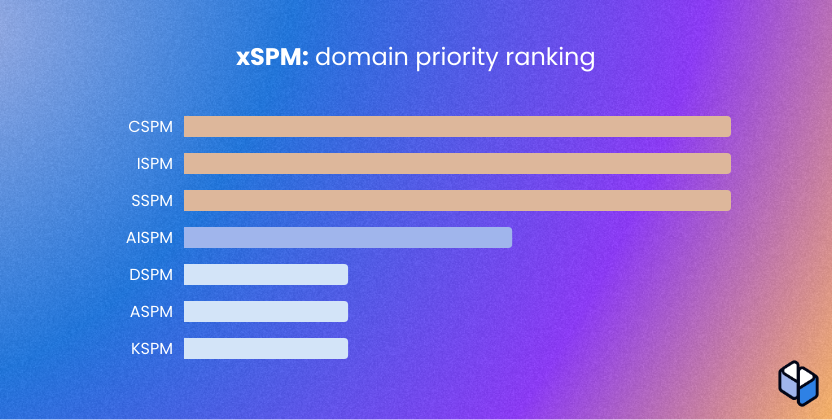
Every security domain now apparently needs its own SPM acronym. CSPM, ISPM, SSPM, AISPM, DSPM, ASPM, KSPM. Vendors love this taxonomy because it creates a buying category for each one. Your team cannot effectively master all of them at once, and anyone who tells you otherwise is selling something.
The practical question is sequencing: which domain gives you the highest risk reduction per hour of analyst time, given your specific environment.
Cloud security posture management (CSPM): Your foundation layer
If your company runs on cloud infrastructure (and at this point, who doesn’t), CSPM is where posture management starts. CSPM watches your AWS, Azure, and GCP environments continuously for misconfigurations, policy violations, and compliance gaps. For most SMBs that are cloud-first by default, CSPM is where posture management should start because the risk surface is already there whether you’re watching it or not. If your environment is predominantly Microsoft 365 or Google Workspace with minimal cloud infrastructure, ISPM first often makes more sense. The sequence below assumes a cloud-first or hybrid posture.
Common misconfigurations that CSPM surfaces include publicly accessible storage buckets, unrestricted security group rules allowing inbound access from 0.0.0.0/0, unencrypted database snapshots, disabled CloudTrail logging, and overly permissive IAM role assignments. Each of these has appeared in real breach timelines. Leaving a storage bucket public because someone was testing something and forgot to revert is not a hypothetical risk. According to IBM’s Cost of a Data Breach Report 2024, cloud misconfiguration accounted for 15% of breaches.
Multi-cloud environments compound the problem. Because AWS, Azure, and GCP each have their own configuration model, policy drift, where teams apply configuration standards inconsistently across cloud accounts or environments, is nearly impossible to track manually. CSPM tools normalize these differences into a single view and alert when resources deviate from baseline.
Key capabilities to evaluate in CSPM tools:
- Real-time misconfiguration detection with severity scoring
- Out-of-the-box compliance rule sets for frameworks like CIS, SOC 2, and ISO 27001 – Integration with your existing ticketing workflow
- Automated remediation options with human approval gates
The last point matters. Fully automated remediation may work well for low-blast-radius findings with a defined rollback path. Anything that touches production access, service availability, or privileged permissions should route to a human approval step first.
Native cloud security tools (AWS Security Hub, Microsoft Defender for Cloud) are a reasonable starting point, especially if you’re single-cloud. Third-party CSPM platforms (like Wiz, for example) offer deeper multi-cloud coverage if you’re already operating across providers.
Cloud misconfigurations rarely exist in isolation, though. The IAM role attached to that misconfigured resource matters just as much, which is where identity posture comes in.
Identity security posture management (ISPM): Where most breaches actually start
Credential abuse is the most common initial access vector in breaches, ahead of phishing and vulnerability exploitation, per Verizon’s 2025 DBIR. That’s the case for putting ISPM at priority two. ISPM continuously monitors your identity environment for risky configurations, excessive permissions, authentication gaps, and account hygiene issues, auditing the actual state of your identity environment rather than just managing the lifecycle.
Traditional IAM tools manage identity lifecycle, provisioning, and access requests. ISPM does something different: it audits the actual posture of your identity environment and flags the gaps.
Orphaned accounts from departed employees that still have active credentials. Service accounts with admin-level permissions that were never scoped down after initial setup. Users without MFA on privileged roles. External identities with access to sensitive systems months after a project ended.
The difference is meaningful. IAM manages the process. ISPM watches the outcome and tells you when the process failed silently.
Where to focus your ISPM effort first:
- Identifying every account with admin or privileged access and verifying each one is still active, assigned to a real person, and protected by MFA
- Finding service accounts and non-human identities that have accumulated excessive permissions over time – Mapping which authentication policies are actually enforced versus configured but not applied
- Surfacing inactive accounts that have gone dormant but remain enabled
For most SMBs, running this audit manually takes weeks and produces a spreadsheet that’s outdated by the time anyone acts on it. But identity is only part of the access picture. The SaaS applications that connect to carry their own posture risks.
SaaS security posture management (SSPM): The overlooked critical domain
Ask most security teams, especially in startups and SMBs, what SaaS applications are running in their environment. You’ll get a list of the ones IT purchased. You won’t get the Slack apps connected via OAuth, the third-party browser extensions with broad Google Workspace permissions, or the AI writing tools that employees authorized with corporate credentials last Tuesday. That’s on top of an already sprawling baseline: the average organization now runs 106 different SaaS tools, even after two straight years of consolidation efforts.
SSPM discovers and monitors the configuration posture of SaaS applications across your environment. What makes SSPM different from traditional software asset management is the depth: SSPM maps OAuth connections, third-party app integrations, user access levels, and configuration settings that deviate from security baselines for platforms like Salesforce, Microsoft 365, Slack, and GitHub.
Common risks that SSPM surfaces include apps authorized to read all email with no business justification, external sharing enabled on cloud storage by default, admin roles in SaaS platforms assigned to accounts that no longer need them, and single sign-on (SSO) not enforced for high-risk applications.
The compliance angle matters too. If your SOC 2 or ISO 27001 program covers data handling, SaaS misconfigurations are directly in scope. A customer record accessible via an over-permissioned integration with a third-party tool is a data protection risk whether your auditor asked about it or not. And auditors are asking about it more often than they were two years ago.
SSPM also helps you tackle shadow IT, the unsanctioned application category, not through blocking (which usually fails), but through visibility. You can’t govern what you can’t see. For compliance-driven teams, that visibility is often the difference between a clean audit and an uncomfortable conversation about controls you didn’t know were missing. And the newest category of unsanctioned tools, AI applications, is growing faster than any SaaS wave before it.
AI security posture management (AISPM): Securing the AI you’re already using
Your developers are using GitHub Copilot. Your support team is running customer queries through an LLM. Someone in marketing connected ChatGPT to your CRM data two months ago. AI adoption actually happens exactly like that in startups and mid-market companies, not through a formal procurement process but through individual tools that solve immediate problems.
AISPM (AI security posture management) is the emerging domain that addresses this reality, and it rapidly becomes a necessity rather than a future priority. AISPM covers shadow AI discovery, data exposure in LLM prompts and integrations, misconfigured API permissions for AI services, and model access controls that existing IAM tools weren’t built to handle.
The core risks AISPM surfaces include:
- Sensitive data flowing into third-party model APIs without data residency controls
- Employees submitting customer PII or source code into public LLM interfaces – AI applications with excessive API access to internal data systems
- No inventory of which AI tools are actually in use across the organization
Early AISPM capabilities focus on AI asset discovery, mapping which AI tools exist in your environment through OAuth connections, API gateway logs, and network traffic analysis. From there, data flow mapping shows you which tools have access to sensitive data and whether appropriate controls are in place.
Start your AISPM evaluation by asking two questions: What AI tools are employees using with corporate credentials, and what data can those tools access. Most teams discover more shadow AI than they expected, and wider data exposure than they planned for.
The supporting cast: DSPM, ASPM, KSPM
Once you have a handle on cloud, identity, and SaaS posture, three additional domains become relevant depending on your environment and risk profile.
DSPM (Data Security Posture Management) focuses on where sensitive data lives, who can access it, and whether access controls match data sensitivity. DSPM classifies data across cloud storage, databases, and SaaS platforms, then maps access rights against that classification. SMB teams should prioritize DSPM when handling large volumes of customer PII, financial records, or regulated data, specifically where data residency or privacy compliance (GDPR, CCPA) is a concern.
ASPM (Application Security Posture Management) aggregates findings from application security testing tools: SAST, DAST, dependency scanners, and software composition analysis. It creates a unified view of your application risk posture, including software supply chain vulnerabilities. ASPM becomes a priority when your team ships software and needs to track vulnerability remediation across development pipelines rather than chasing individual scanner outputs.
KSPM (Kubernetes Security Posture Management) monitors Kubernetes cluster configurations, runtime security policies, and container access controls. Misconfigured RBAC (role-based access control) in Kubernetes, exposed dashboards, and privilege escalation paths show up regularly in KSPM scans. KSPM becomes relevant when Kubernetes is a significant part of your infrastructure, not before.
Treat these three as layer-two priorities. Build a solid foundation in CSPM, ISPM, and SSPM first, then expand coverage as your program matures.
SPM tool selection: Choosing tools that match your resources
Buying an SPM tool without a decision framework is how teams end up with five overlapping scanners, three dashboards nobody checks, and a renewal conversation that makes everyone uncomfortable. The average enterprise security team already runs dozens of overlapping tools, each with its own dashboard, alert logic, and reporting format.
The first question worth asking: “what problem am I solving in the next 90 days?” Your answer determines which domain to start with, and which tooling category to evaluate.
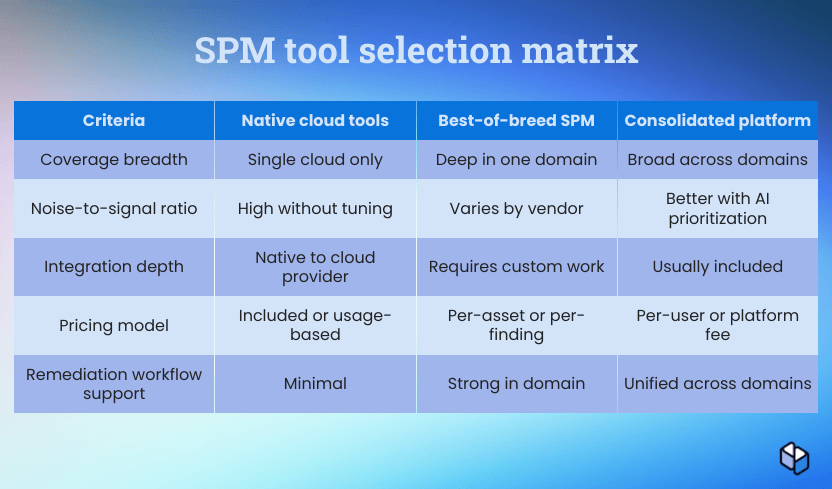
Key evaluation criteria for SPM tools:
- Remediation workflow support. Discovery without remediation guidance is expensive noise. Evaluate whether the tool suggests fixes, generates policy-as-code, or integrates with your deployment pipeline.
- Coverage vs. noise ratio. A tool that generates 600 findings on day one with no severity context is not useful. Look for tools that prioritize contextually, not by CVSS score alone.
- Integration depth. Your SPM tool needs to feed findings into the workflows your team already uses: Jira, ServiceNow, Slack, PagerDuty. A tool that requires people to log into a separate dashboard daily will get ignored within a month.
- Pricing model. Per-asset pricing can surprise you in cloud environments where asset counts fluctuate. Per-user models are more predictable for small teams. Understand the cost at 2x your current scale.
Ask vendors directly: What does onboarding look like for a three-person team. Can you run a proof of concept against a subset of your environment before committing. And how do you handle false positives and how do customers tune the signal. If the vendor dodges any of these, that tells you something.
Red flags in vendor pitches include promised “zero-touch deployment” with no mention of tuning time, pricing quotes that exclude implementation or integration costs, and demo environments that look nothing like your actual infrastructure.
Consolidated platforms reduce context-switching overhead but may lag in depth for specific domains. Best-of-breed tools give you depth but multiply the integration burden. For resource-constrained teams, consolidation usually wins unless you have a specific domain gap that only a specialist tool addresses.
Once you’ve picked your platform, the next challenge is rolling it out without drowning in alerts on day one.
Implementation roadmap: Getting started without burning out your team
Big-bang SPM deployments fail more often than they succeed. The pattern is predictable: too many tools onboarded simultaneously, no clear ownership for findings, alert volumes that overwhelm the team within weeks, and a program that stalls while everyone focuses on the next fire.
A phased approach works because it generates quick wins, builds team confidence, and creates remediation muscle before you scale the coverage.
Phase 1: Inventory and baseline (weeks 1-4)
Before you buy anything, understand what you have. Map your cloud accounts, SaaS applications, and identity providers. Run a basic misconfiguration scan against your cloud environment using native tools if you haven’t invested in third-party CSPM yet. The output is a risk baseline, not a to-do list. You’re establishing where you start, not trying to fix everything.
In practice, this phase might extend beyond the four-week period. Getting complete visibility into cloud accounts, SaaS apps, and identity providers usually depends on stakeholder cooperation that isn’t always there on day one.
Phase 2: Automated monitoring and remediation workflows (weeks 5-8)
Activate your first SPM tool against your highest-priority domain. Configure severity thresholds so only critical and high issues generate immediate alerts. Build a remediation ticket template in your ticketing system.
Assign ownership: the person or team responsible for fixing alerts in each domain. Nothing kills posture programs faster than findings that land in a shared queue with no owner.
Phase 3: Expand coverage and integrate (weeks 9-12)
Add your second domain. Connect SPM findings to your SIEM for correlation. Review your posture score against the week-one baseline and document the delta for your leadership report.
Change management is not optional. Your developers need to understand why a finding in their cloud account requires their action. Your IT team needs context for why an identity alert matters. Brief, specific communication about why posture matters, tied to a real example from your environment, is worth more than a 40-slide security awareness program.
Set realistic leadership expectations early. Measure posture improvement by trajectory, not a single score. Show the trend, not the number alone.
With a working SPM program in place, the next priority is making it sustainable without adding headcount.
Making SPM sustainable: Integration and automation strategies
Running four separate SPM domain tools means four login contexts, four finding formats, four alert queues, and a security analyst who spends most of their day correlating information that should already connect For a team with one to five security people, that overhead is genuinely unsustainable.
The teams getting the most out of limited headcount tend to consolidate on platforms that reason across domains rather than correlating findings manually. Sola takes that approach, unifying context from cloud, identity, and SaaS tools into a single intelligence layer so analysts get cross-domain perspective and prioritized next steps rather than isolated alerts from disconnected scanners.
Beyond platform consolidation, automation strategies that work without a large team include:
- Writing policy-as-code for repeatable remediation. For misconfiguration types you see repeatedly, writing the fix as code means Terraform or CloudFormation templates that enforce your security baseline, so the same misconfiguration doesn’t need a human to fix it the third time.
- Configuring auto-remediation with approval gates. Auto-closing low-severity issues that match known-safe patterns, routing critical alerts to a human, and sending middle-severity items to a queue with SLA targets rather than an infinite backlog.
- Integrating with your SIEM for correlation. SPM findings combined with your SIEM’s event data surface things that neither tool catches alone: a misconfigured S3 bucket that was also accessed from an unusual IP in the last 48 hours is a different priority than one that hasn’t been touched in months.
- Automating ticketing workflows. Auto-creating tickets with finding context, severity, and suggested remediation steps removes the manual translation step between scanner output and a Jira ticket.
Prioritization frameworks, specifically risk-based scoring that weights exploitability and business context above raw CVSS scores, let a single analyst make better decisions about what to fix this week versus next quarter.And once your team is prioritizing effectively, you need a way to prove it’s working.
Measuring SPM success: KPIs that actually matter
Vanity metrics in security are everywhere. “We closed 400 findings this month” sounds impressive until someone asks what severity those findings were and whether any new critical ones opened.
Metrics that actually reflect posture improvement:
- Mean time to remediate (MTTR) for critical findings. How long does it take your team to detect a critical misconfiguration and verify the fix? Trending this number down over time is a meaningful signal.
- Mean time to detection (MTTD) for new misconfigurations: how quickly does the program catch something new, not just resolve it. MTTR without MTTD leaves a blind spot in whether your coverage is keeping pace with environment change.
- Posture score trend. Not a single score, but the week-over-week or month-over-month direction. A rising posture score with a documented remediation rate tells a coherent story.
- Critical finding reduction rate. Track the number of open critical and high issues over time. If you’re closing more than you’re opening, your program is working.
- Coverage percentage. Measure what percentage of your cloud accounts, SaaS applications, and identity providers you actively monitor. Gaps in coverage are gaps in visibility.
- Compliance mapping alignment. For ISO 27001 or SOC 2 programs, track how SPM results map to specific control requirements. Doing so turns posture data into audit evidence without extra work.
Reporting to non-technical leadership works best when you lead with business language. “We reduced the number of externally exposed services from 12 to two” lands differently than “we improved our CSPM score by 14 points.” Both can be true. Lead with the one your CISO or board will understand without a translation layer.
Even with the right metrics in place, SPM programs can stall for reasons that have nothing to do with measurement.
Common SPM pitfalls and how to avoid them
SPM programs tend to stall for operational reasons more than tooling reasons. These are the patterns that show up most often.
- Alert fatigue from unconfigured severity thresholds. SPM tools ship with default configurations that flag everything. Because most environments generate hundreds of low-severity findings on day one, teams that skip threshold tuning immediately find themselves drowning in noise, which leads to ignoring the dashboard entirely within weeks. Fix: configure severity thresholds and alert routing before your first production scan.
- Treating SPM as a project, not a program. A posture assessment has a start date and an end date. SPM has a start date and no end date. Teams that implement SPM tooling as a project, declare victory, and move on will find their posture degraded six months later because drift is continuous. Assign an owner, schedule recurring reviews, and treat posture management as an ongoing operational function.
- Ignoring identity and SaaS in favor of cloud only. CSPM is the highest-ROI starting point, but stopping there leaves two of your biggest risk surfaces unmonitored. The majority of successful attacks use compromised credentials or SaaS misconfigurations at some point in the kill chain. Expand to ISPM and SSPM within the first six months.
- Buying tools without remediation workflows. A scanner that surfaces issues without a clear path to remediation costs you time while barely moving your actual risk posture. . Before signing a contract, map out exactly who will own findings, how you will route them, and what the remediation SLA looks like. If you can’t answer those questions before purchasing, you’re not ready to buy.
- Failing to assign ownership. Findings that land in a shared queue owned by nobody get fixed by nobody. Every domain in your SPM program needs a named owner accountable for remediation progress. For small teams, one person owning two or three domains is fine. A domain with no owner attached is not.
Avoiding these pitfalls gets your SPM program to a functional baseline. The next question is what becomes possible once that foundation is in place and AI enters the picture.
How AI is changing security posture management
The core problem with traditional SPM comes down to volume. A properly configured CSPM deployment across a mid-sized AWS environment can generate thousands of findings per week. Add ISPM and SSPM, and you’re looking at a signal volume that no team can meaningfully process without help. Most organizations end up triaging by severity label alone, which misses the contextual relationships that determine actual risk.
AI changes that dynamic in several meaningful ways.
- Cross-domain correlation is the most impactful capability. An AI-native SPM system can connect a misconfigured S3 bucket (CSPM) to the IAM role that has access to it (ISPM) and the SaaS application that’s writing data there (SSPM), and present them as a single risk chain rather than three separate alerts. Getting that context packaged automatically is what turns an issue into a prioritized action item, and what separates teams actively reducing risk from teams maintaining a very organized to-do list.
- Auto-prioritization based on actual exploitability replaces generic CVSS scores with environment-specific risk signals. A critical misconfiguration on a resource that handles no sensitive data and has no external exposure is different from the same misconfiguration on a resource that’s publicly accessible and contains customer records. When AI can reason about that difference continuously and adjust priority rankings as your environment changes, stretched teams stop spending remediation effort on low-impact issues while high-impact ones wait.
- Natural language querying of posture data is a practical advantage for teams without a dedicated cloud security architect. Instead of writing custom queries or wrestling with dashboards, a team member can ask “which of our S3 buckets are publicly accessible and contain data tagged as sensitive?” and get an immediate, contextualized answer. . For teams where one person covers cloud, identity, and SaaS without a specialist in any of them, that kind of access closes the expertise gap substantially.
- Continuous drift detection is the fourth capability worth understanding. Traditional SPM tools alert you when a misconfiguration appears. AI-native platforms can tell you whether that misconfiguration is net-new, a regression from a previously remediated state, or part of a pattern across multiple resources that suggests a systemic policy gap. The difference between “you have an issue” and “this changed, here’s why it matters, and whether you’ve seen it before” determines whether your analyst spends 20 minutes or two hours on resolution.
The honest caveat: AI-assisted SPM is only as good as the coverage underneath it. A platform that sees only your CSPM data can’t do cross-domain correlation. One without identity and SaaS context can’t tell you whether a misconfigured S3 bucket is reachable by a real account with real permissions. Coverage breadth is the prerequisite for AI reasoning to be useful. Buy for coverage first, AI capabilities second.
Sola is built around this model. Connect your cloud accounts, identity provider, and SaaS applications, and the platform adds the layer most security tooling is missing: shared context and reasoning across all of them. Your team can ask which IAM roles carry unused permissions, which SaaS apps access customer data without SSO, or which issues from this week overlap with external exposure, and get answers in minutes, with cross-domain intelligence already assembled.
Security teams have never been short on data. The advantage with AI comes from turning that fragmented data into knowledge you can act on.
Key takeaways
- SPM addresses real-time risk state, not compliance checkboxes. You can pass a SOC 2 audit and still have over-permissioned admin accounts nobody reviewed since the audit closed.
- Sequence your SPM domains by risk reduction per analyst hour: CSPM first (cloud misconfigurations), ISPM second (credentials and identity hygiene), SSPM third (OAuth sprawl and shadow SaaS).
- Before buying any tool, define who owns findings, how they route to tickets, and what remediation SLAs look like. Scanners without remediation workflows create expensive noise.
- Configure severity thresholds and alert routing before your first production scan. Default settings flag everything, and teams that skip tuning abandon the dashboard within weeks.
- Measure posture improvement with MTTR for critical findings, critical issue reduction rate, and coverage percentage across environments. Lead board reports with business outcomes, not scores.
Cross-domain SPM, without the correlation overhead.
Get started with Sola.

Chief Information Security Officer, Sola Security
Yoni has spent the past decade leading security engineering at companies like Meta (formerly Facebook) and AppsFlyer, and now brings his sharp eye and steady hand to Sola as CISO. Known for phishing drills so sneaky they make the real attackers take notes, he stays chill even when everyone else is refreshing dashboards and reaching for incident snacks.