The blind spots between Jamf and your EDR

TL;DR
- Jamf and your EDR each manage their own device inventory. Neither cross-references the other, so coverage gaps hide in the space between them.
- Failed installs, incomplete offboarding, and sensor drift quietly create endpoints that look covered but carry no protection.
- Coverage gaps create compliance exposure and slow down incident response, especially when you can’t confirm whether a device had a functioning sensor at the time of an event.
- Sola’s Jamf + EDR template connects both data sources into a single, continuously updated view, so you can catch coverage gaps and sensor health issues instead of building spreadsheets.
Somewhere in your fleet, a MacBook that left the building six months ago still shows up as “protected” in your EDR dashboard. Jamf marked it inactive weeks ago. The EDR console never got the memo.
That’s one device you can actually trace. Across a fleet of hundreds or thousands of endpoints, the gap between what Jamf knows and what your EDR knows grows quietly. Which managed devices actually carry an active agent? Which EDR-monitored endpoints never enrolled in your MDM? Answering those questions today usually means pulling exports and building spreadsheets, or deploying a full asset management platform with its own integration and licensing overhead. The distance between “managed” and “protected” is where risk builds.
Why coverage gaps happen
Nobody plans a coverage gap. They accumulate through the normal friction of running a fleet.
A new hire gets a MacBook enrolled in Jamf on day one, but the EDR agent install fails silently during provisioning. The device shows up as “managed” in your MDM console, and nobody checks whether the sensor actually landed. Multiply that across dozens of onboarding cycles, and you have endpoints that look compliant but carry zero detection capability.
Offboarding creates the mirror problem. An employee leaves, IT wipes the device or reassigns it, and the Jamf record updates. But does the EDR console reflect the change? Often, stale agents linger for months, inflating your “covered devices” count while the actual machine sits in a drawer or gets reissued without a fresh sensor install.
Then there’s version drift. A device technically has an EDR agent, but the sensor hasn’t checked in for weeks, or it runs a version so outdated that its detection capabilities are months behind. The dashboard says “installed.” Functionally, it’s dead weight.
Research from Palo Alto Networks found that nearly 39% of devices registered in Active Directory lack proper EDR or XDR coverage, and 33% of network-connected assets are entirely unmanaged. Jamf and your EDR follow the same pattern: each generates its own inventory, its own status fields, and its own timestamps. Stitching those two views together today means exporting CSVs, matching on hostname or serial number, and hoping your naming conventions line up cleanly enough to produce a usable join
Most teams run that exercise quarterly at best, usually right before an audit. In between, gaps go unnoticed.
Knowing where gaps come from is one half of the problem. Knowing which questions to ask your fleet data, consistently and automatically, is the other.
The questions your fleet data should answer
If you could query your Jamf inventory against your EDR deployment in real time, what would you ask first?
Security teams already know the questions. They come up in Slack threads, whiteboard checklists, and audit prep docs. But the questions themselves deserve a permanent home, not a one-off spreadsheet. Here are the ones that matter most:
- “Which Jamf-managed devices have no EDR agent installed?” The foundational coverage question. Every device your MDM knows about should have a matching sensor. Any gap here is an unprotected endpoint sitting on your network.
- “Which endpoints have an EDR agent but don’t appear in Jamf at all?” The reverse of the coverage gap. A device with a sensor but no MDM enrollment means you’re detecting threats on an endpoint you can’t manage, patch, or wipe remotely.
- “Which devices enrolled in Jamf in the last 7 days and still lack EDR coverage?” New devices represent fresh exposure. If your provisioning workflow doesn’t guarantee an EDR install on every enrollment, you need to catch the misses fast.
- “Show me devices that haven’t checked in for 30 or more days and have no active EDR sensor.” Stale plus unprotected is the worst combination. These are the endpoints most likely to be lost, off-network, or compromised without anyone noticing.
- “Which endpoints have an EDR agent installed but marked inactive?” Installed doesn’t mean running. An agent that’s present but not active gives you a false sense of coverage while providing zero detection value.
- “What percentage of my managed fleet actually has active EDR coverage right now?” The summary metric your CISO or auditor will ask for. You should be able to answer it in seconds.
The questions are clear. The fact that answering them still takes a spreadsheet exercise tells you something: the problem has outgrown your security team’s workflow and landed in governance territory.
Coverage gaps are a governance problem, too
An unprotected endpoint is a detection problem. Not knowing it’s unprotected creates a governance gap. The second one tends to show up in audits.
Compliance frameworks like SOC 2 and ISO 27001 require evidence that endpoint protection applies consistently across your fleet, with timestamps, enrollment records, and reproducible coverage metrics. If your only way to produce those numbers involves a manual cross-referencing, the artifacts are already stale by the time you finish assembling them.
Audits are the scheduled version of the problem. The unscheduled version shows up during incident response, when a compromised device turns out to have had no active sensor, and no one had been tracking that gap before the incident. That finding lands in the post-incident report, in front of leadership, and it reads as a process failure, not a technical one.
Sensor versioning, enrollment status, last-seen timestamps, and coverage ratios all feed into your broader security posture. Tracking them once a quarter means you’re governing with a 90-day blind spot. The tooling to close it needs to do one thing well: align your Jamf inventory against your EDR deployment in real time.
How Sola’s Jamf + EDR template solves this
You already own the tools that generate the data. Jamf tracks your device inventory. CrowdStrike or SentinelOne tracks your endpoint protection. Dedicated asset management platforms can bridge the two, but they bring their own deployment and licensing overhead. The missing piece is a lighter intelligence layer that connects your existing tools and flags what needs your attention.
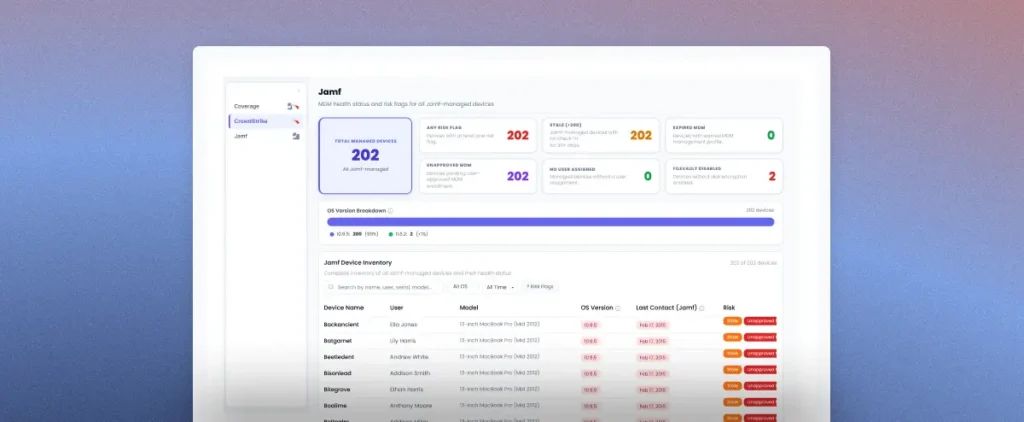
Sola’s Jamf + EDR template does exactly that. You connect your Jamf instance and your EDR console, and Sola cross-references them. From there, you can see which managed devices carry an active sensor, which ones don’t, which endpoints enrolled recently but still lack coverage, and which devices have gone stale without anyone noticing. You get the full fleet picture without exporting a single CSV.
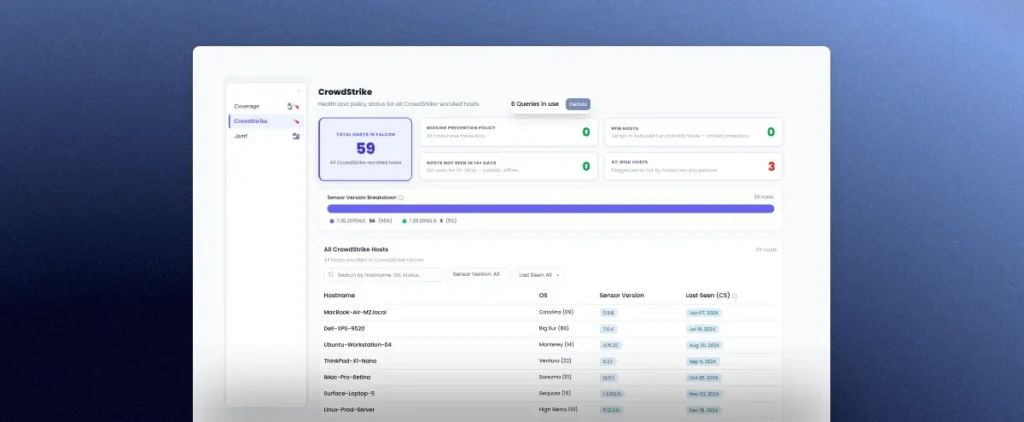
The template also catches the risk conditions that typically hide between reviews:
- Sensors running in a degraded state with reduced protection capabilities
- Endpoints configured to monitor threats but not actively block them
- Devices flagged for health issues, infections, or outdated agent versions
- Endpoints where the EDR agent is installed but hasn’t reported as active
Because queries run against your latest synced data from both sources, the answers reflect your fleet’s current state rather than a point-in-time export from weeks ago. You monitor fleet health continuously rather than rebuilding the picture from scratch before every audit or incident review.
Moving from quarterly spreadsheet checks to always-current fleet visibility takes less time than you’d expect.
Build endpoint visibility that runs itself
Discovering a coverage gap after an incident is the expensive version of endpoint governance. Surfacing gaps continuously, before they become findings in a post-mortem or an audit report, is the version your team actually wants to operate in.
The Jamf + EDR template gives you that shift. Connect your data sources, and you’ll have a canvas with coverage metrics, fleet health status, and drill-down detail for every device within minutes. You can also set alerts on coverage drops so your team catches shifts as they happen.
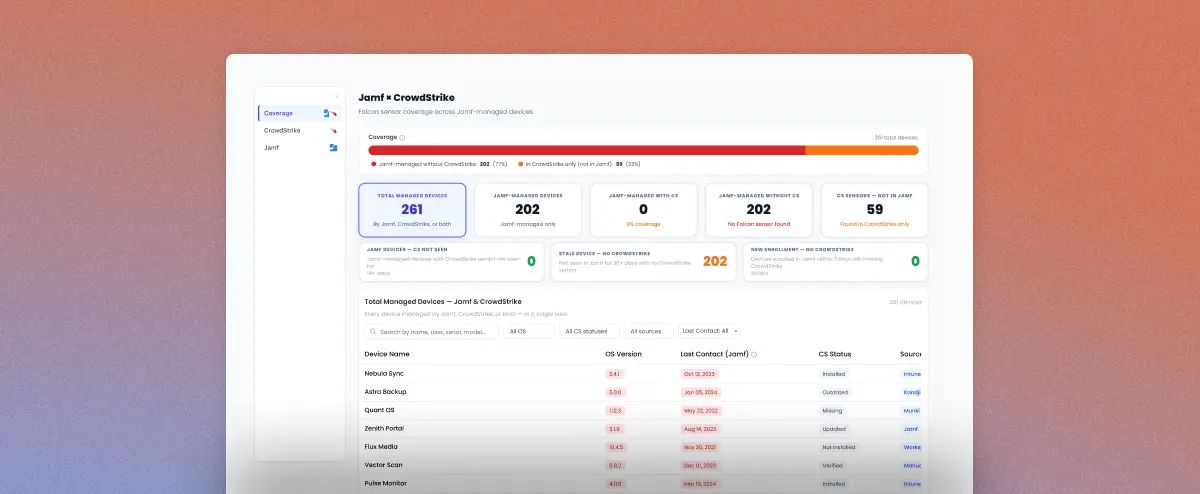
Get Jamf & EDR endpoint security coverage with Sola.
Sign up and grab the template from the Template Gallery.
Key takeaways
- Jamf and your EDR operate in silos by default. Coverage gaps accumulate through failed installs, incomplete offboarding, and sensor drift, and nobody catches them without deliberate cross-referencing.
- The five questions every security team should be able to answer about their fleet (missing agents, new enrollments without coverage, stale devices, inactive sensors, overall coverage percentage) need a permanent, automated home.
- Gaps in endpoint coverage carry compliance and incident response consequences that go beyond day-to-day security operations.
- Sola’s Jamf + EDR template turns those fragmented data sets into a single, unified coverage view and sensor health view, so you fix gaps rather than hunt for them.
Frequently asked questions

Security Innovation Engineer, Sola Security
Gal brings a hands-on approach to security, shaped by years of security engineering across global environments and a curiosity for digging into what’s actually going on in an environment. At Sola, she turns real-world challenges into security innovations, taking messy signals and making them something the team can act on. After hours, she’s either dancing ballet or trying (unsuccessfully) to convince Leo the dog he’s not running the house.